Make self-serve onboarding work
Seed-stage robotics startup needed to enable self-serve onboarding before scaling. 5-day research sprint: tested product as first-time user, then used AI framework to analyze 20+ hours of recordings in one day. Result: 46 prioritized issues with 35% preventing AI assistants from helping users.
Problem
Seed-stage startup built a data analytics platform for robotics engineers. As they scaled, they hit a bottleneck: every customer needed hand-holding to start.
Team wanted to fix obvious UX issues before external testing. But didn't know where to start fixing.
The goal: enable self-serve adoption—customers learning on their own or with AI assistants like ChatGPT.
My role: First-time user evaluation → identify and prioritize blockers. 40 hours over 2 weeks1. Team's first UX consultant—worked with engineering and founders.
Research
Method: Cognitive walkthrough2. I documented my learning experience, then used AI-assisted framework3 to analyze 20+ hours of qualitative data in one day.
Two critical challenges I had to solve:
Challenge 1: Being both user and researcher
How do you experience something genuinely while analyzing it objectively? How do you know your struggles represent real users, not just your gaps?
My approach: separate experiencing from analyzing.
- Before: Asked the team to describe target users. Cross-referenced with my background. Documented where I didn't fit.
- During: Screen recordings with think-aloud. Voice notes after each task. No analysis while learning—just experience and document.
- After: Debriefed with team members. Asked: "Based on customer support experience, how likely would users hit this?" Flagged "possibly just me" issues separately. This validation loop kept me honest.
I shared preliminary findings after Day 1—showed the team real friction points with timestamps. This early preview built trust and validated the direction.
Challenge 2: Analyzing 20+ hours of data in one day
Traditional qualitative analysis takes weeks. I had one day.
First, I built the framework (2h).
I picked 1-2 representative tasks and fed them to AI to spot preliminary issues and suggest analytical dimensions. Then we built the coding framework together.
Key fields included standard usability metrics (task, severity, user quotes with timestamps) plus two business-critical dimensions.
| Column | Header | Description |
|---|---|---|
| A | # | Issue ID |
| B | Task | 1, 2, 3, 4, or 5 |
| C | Issue Title | Major issue that might cause multiple confusion moments |
| D | Issue Summary | One sentence description |
| E | User Quote | Direct quote and timestamp from transcript, e.g., "I don't know how to ...." (24:32, filename "T3-3") |
| F | Area | Dev workflow, Doc gaps, Doc UX, GUI, Prerequisites, SDK issues |
| G | Severity | Critical = stops task or causes abandonment; Major = significant delay but continues; Minor = small annoyance |
| H | GenAI Can Help User? | Yes/No/Partial - can user ask AI to get unstuck? |
| I | Impact Vibe Coding? | Yes/No—must fix before the vibe coding research? |
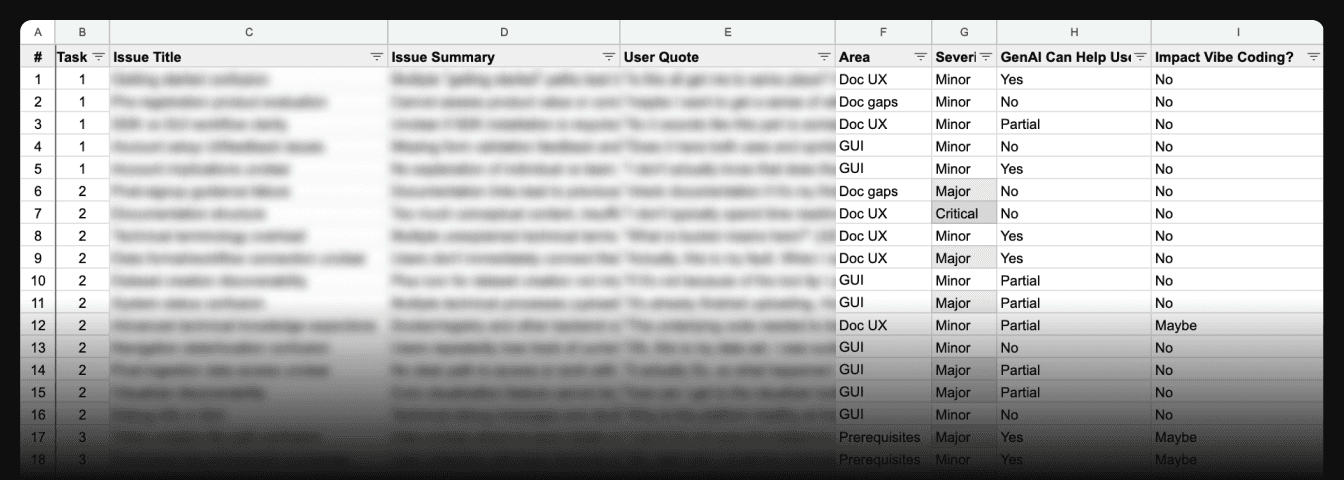
The upfront investment paid off. Every issue got analyzed the same way.
Then I ran the analysis (2h).
I crafted detailed prompts against the framework. First attempt was too high-level. "Users struggle with setup"—already knew that. Second attempt was too detailed and overwhelming. AI flagged every tiny UI inconsistency.
What worked: dual passes—detailed for evidence, high-level for themes.
Prompt excerpt:
I have transcriptions from think-aloud sessions where I documented my experience as a first-time user. I will analyze this data and present findings to the cofounder.

Perform this step by step. Ask for my review before continuing to the next step.

1. Analyze the entire transcript. Capture every friction point, confusion, and usability problem in spreadsheet format using the columns defined below.
2. Re-analyze to identify any missed issues or misunderstandings.
3. Consolidate issues that share root causes or solutions.
Finally, I validated and prioritized (2h).
AI gave me a fast first pass at categorizing issues. But it got things wrong. More importantly, it couldn't judge business impact.
Example: Poor doc organization took huge time in my recordings. AI flagged it critical. But GenAI can locate the content instantly. Missing content? Broken GUI? GenAI can't fix those.
That distinction changed priorities.
Results
46 issues identified across 6 categories. 10 critical blockers.
Key insight: 35% stopped AI assistants from helping—AI could explain syntax but couldn't debug environment setup or interpret errors.
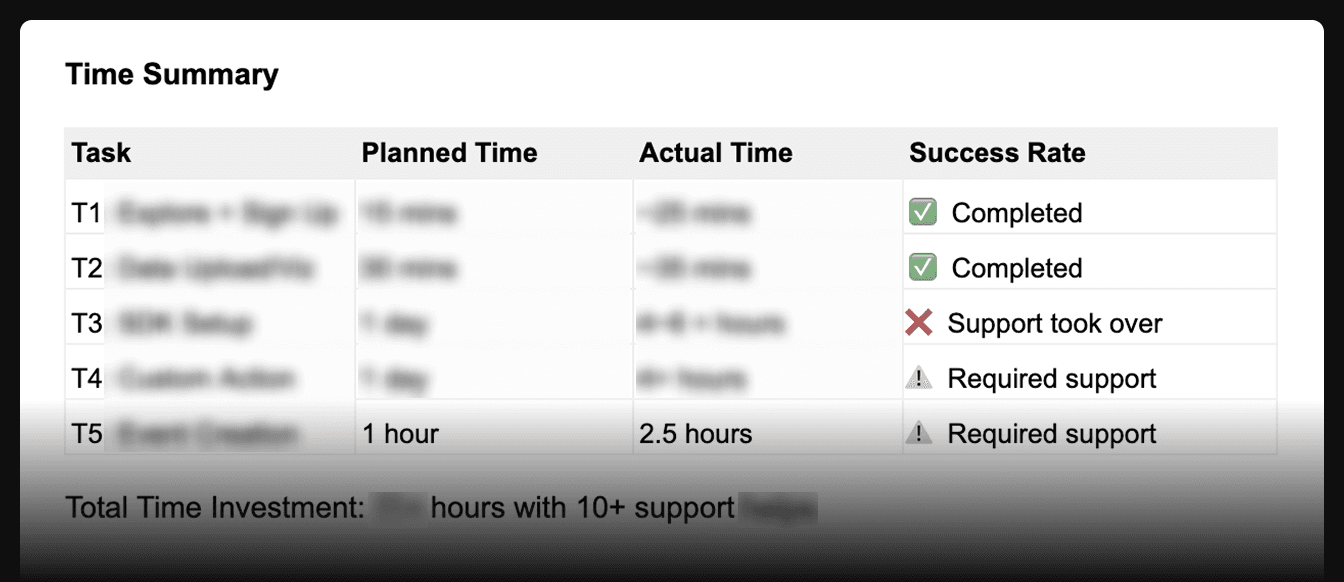
I tracked completion times against team estimates. Tasks estimated at 1 hour took 2.5+. Some failed. That gap quantified what blocking adoption meant.
Impact
Team went from "we know there are issues" to a prioritized action plan. Engineers adopted "5 minutes to wow" as a design principle—they still reference it when evaluating onboarding.
- Quick-win UI fixes
- Improved workflows for users without Python expertise
- Technical complexity hidden behind platform
Reflections
Building the framework first made the one-day analysis possible. Two hours defining fields and severity levels gave AI clear rules.
Human judgment can't be delegated. AI found patterns fast. But it couldn't judge impact—whether AI assistants can work around something, what matters for business goals right now.
The framework is reusable—the field definitions and prompt structure could be adapted for ongoing customer research without starting from scratch.
Footnotes
-
2.5 days a week over 2 weeks. ↩
-
Cognitive walkthrough: A usability inspection method where evaluators simulate a user's problem-solving process for specific tasks. ↩
-
Used Claude Pro (Anthropic) for systematic analysis and Gemini for transcription with timestamps. All data reviewed to remove confidential information before AI processing. ↩